You ask. We answer.
The questions customers really ask us on calls and WhatsApp about VeeTrax, VeeAssets and our AI Voice Agent, answered in plain words.
No matching question. Ask us on WhatsApp or call +91 94449 07658.
VeeTrax vehicle tracking
Device offline, not updating or jumping?Try our step-by-step GPS device troubleshooting guide →Which GPS devices work with VeeTrax?
Most GPS devices on the market, including GT06, Teltonika, JT808 and AIS-140 units. Tell us your device model and we'll confirm before you buy. No device? Use the free VeeTrax Tracker app on any Android phone.
Can I track a vehicle without fitting a device?
Yes. Install the VeeTrax Tracker app on the driver's Android phone and the phone becomes the tracker, with an SOS button too. A fitted GPS device is still best for vehicles that must be tracked all the time.
Will I know straight away if my driver is overspeeding?
Yes. You get instant alerts for overspeed, ignition on/off, geofence in/out, power cut, tamper and device offline. Turn on voice and each alert is read aloud. SOS, crash and power-cut alerts ring a loud alarm even when the app is closed.
Can I see where my vehicle went yesterday?
Yes. Trip replay plays any trip back on the map with total kilometres, stops, idle time and speed.
My customer keeps calling "where is my delivery?" Can they track it?
Share a live-location link. Your customer opens it in any browser, with no app or login, and sees the vehicle and the arrival time. The link stops when you switch it off.
What if someone moves my parked vehicle at night?
Turn on parking mode. If the parked vehicle moves, your phone rings a loud alarm.
Can I get reports without logging in every day?
Yes. Reports can be e-mailed on a schedule, and you can download the dashboard or a map picture with your company name.
Does it work in Tamil and Hindi?
Yes. The app works in English, Hindi and Tamil, and you can type questions to Ask VeeTrax in any of them. Each answer has a button that opens the right page.
Can another company see my vehicle without controlling it?
Yes. Share a vehicle in view-only mode with another company or a client. You stay in control and can stop sharing any time.
Is there an iPhone app?
VeeTrax works on the web and on Android today. The iPhone app is coming soon; until then iPhone users can use the web version.
VeeTrax Staff Attendance
How does attendance mark itself?
You mark your offices and sites on the map. When a staff member's phone or ID card reaches a site they're checked in; when they leave, they're checked out. No punching, no registers.
How do I know staff aren't marking a friend present?
Check-in comes from each person's own phone location. You can also ask for a selfie or a 10-second video at check-in, stamped with name, time, address and location.
What if someone steps out during the day?
The app asks them, "Were you out on work?" Official duty, such as a bank or client visit, counts as worked time; personal time doesn't. You always have the final word.
How is overtime counted?
Only time worked after the shift ends, beyond a full day. Staying late to make up for a late start isn't overtime, and a few minutes after the end are ignored.
Someone forgot their phone or was on leave. Can I fix the day?
Yes. Correct the day by hand with a reason. Every correction is kept, with who made it and why.
Will this work with my payroll?
At month end the payroll report is ready: payable days, loss of pay, late, early, hours and overtime, in Excel, PDF or CSV. Or connect your payroll software directly with a secure VeeTrax API key.
Can I just ask who is absent today?
Yes. Type "attendance", "who is absent today", "lates this week" or "who is out now" in English, Hindi or Tamil, and Ask VeeTrax answers in one screen.
How long does setup take?
About fifteen minutes: mark your sites, set shift hours, and staff activate the Tracker app on their Android phones.
For developers: GPS parsers, API & data forwarding
Data Forwarding
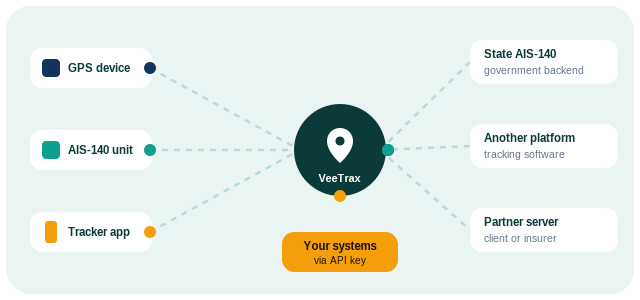
Send a copy of the data received from your devices to another server: a state AIS-140 backend, another tracking platform or a partner. You keep using VeeTrax as normal.
Developer API
Bring VeeTrax data into your own systems, such as ERP, payroll, dispatch or your own app, with a secure API key.
GPS parser development
Do you build parsers for GPS devices?
Yes. We develop GPS parsers that decode the raw data a tracking device sends into clean, usable information: location, speed, ignition, alerts and more. Our parsers support all industry-standard GPS devices and protocols.
Which devices and protocols do you support?
All the common industry-standard protocols, for example GT06 / Concox, Teltonika, JT808, AIS-140, H02, TK103, Queclink and Meitrack. If your device isn't on this list, ask us; we very likely support it already.
Our device uses its own or a custom protocol. Can you still parse it?
Yes. Share the protocol document and, if possible, a sample device or data log. We build the parser, test it against real data from the device, and hand it over working.
What information does a parser decode?
Whatever the device sends, typically GPS position, speed, direction, ignition, power and battery status, odometer, alarms such as SOS, tamper and overspeed, and sensor readings such as fuel or temperature where the device supports them.
We have our own tracking platform. Can you build just the parser for us?
Yes. We build standalone parsers for your platform. The parser receives data from the devices and delivers it to your server or database in the format your system needs. You don't have to use VeeTrax.
Do I need a parser if I use VeeTrax?
No. VeeTrax already includes parsers for all industry-standard devices. Just tell us your device model and we'll connect it.
Developer API & data forwarding
My vehicles must report to the state AIS-140 server. Can I still use VeeTrax?
Yes. With data forwarding, VeeTrax sends a live copy of each device's data to the state AIS-140 backend while you track everything in VeeTrax. One device, both destinations.
We're moving from another tracking platform. Can both run together?
Yes. Forward a copy of your device data to your old platform while your team switches over, then stop forwarding when you're ready. No need to reconfigure every device twice.
Can our client or partner receive the data on their own server?
Yes. Add the partner's server as a forwarding destination and they receive a copy of the data from the vehicles you choose. You decide what is shared and can switch it off any time.
Does forwarding change or delay my VeeTrax data?
No. VeeTrax keeps the original data for your map, alerts and reports; the destination gets a copy.
What can I do with the API?
Pull vehicle positions, trips, alerts and attendance into your own software, for example to show live locations in your ERP or send attendance to payroll. Access uses a secure VeeTrax API key that you can revoke at any time.
How do I get the API documentation or set up forwarding?
Call or WhatsApp us on +91 94449 07658 with the destination server details or what you want to build. We'll share the API documentation and set up forwarding for you.
VeeAssets asset tracking
We already have our assets in Excel. Do we type them again?
No. Upload your Excel sheet. VeeAssets checks the whole sheet first and highlights errors and duplicate tags or serial numbers before anything is saved.
What labels do we need?
Each asset gets a unique tag and QR code, next to your own tag. Print small, medium or large labels, one at a time or many at once, with or without serial numbers.
Who has our equipment right now?
Scan its QR label to see the holder, due date, condition and where it was checked out. The holders list shows what each employee, vendor or contractor has.
How do we prove the condition an asset was returned in?
At check-out and check-in you take two photos, each stamped with date, time and location, and record the condition. Every trip is kept in the asset's history.
The label is damaged or the phone has no camera. What then?
Just type the tag. VeeAssets also reads normal barcodes, and you can reprint a label any time.
Can it remind us about calibration and service?
Yes. The dashboard shows what is due for calibration or service, with a one-tap call to the service engineer.
How do we do a stock-take?
Walk the site and scan each label. VeeAssets shows what is found, missing, misplaced or checked out as you go.
Can we track parts inside an asset?
Yes. Track components by serial number: installed, spare, faulty or sent for repair.
What reports do we get?
20+ ready-made reports on stock, people, activity, components and finance, in Excel, CSV or PDF.
Can we control who does what?
Yes. Admin and user roles control access, and each person picks English, Tamil or Hindi. It works on the web and Android.
AI Voice Agent
What exactly does the AI Voice Agent do?
It handles both sides of the phone. It calls out on your schedule, for feedback, reminders and follow-ups, and answers every incoming call instantly, day or night, in a calm, natural voice.
Will my callers know they're talking to a robot?
The voice sounds like a person, not a robocall, and it listens to answers instead of reading a script. It also tells callers at the start that they're speaking with an automated assistant, as the rules require.
Can it speak Tamil, Hindi and other languages?
Yes. It's multilingual and holds the conversation in the caller's preferred language. Tell us which languages your callers use and we'll set it up.
How do outbound calls start?
Upload a call list and a time, and the agent dials out on its own, with automatic retries for calls that go unanswered. For hospitals, marking a patient as discharged can schedule the feedback call for the next day automatically.
How do hospital patient feedback calls work?
The agent calls each patient after discharge and asks a short set of questions about their stay in their own language. If a response signals a problem, an instant alert goes to the Grievance Cell and the treating doctor, so someone can call the patient back the same day.
What happens when a caller needs a real person?
The agent understands what the caller wants and routes urgent calls straight to your staff, or to the right desk or department, like a smart IVR.
Can it book and reschedule appointments?
Yes. Inbound callers can book or reschedule appointments and get answers to common questions instantly, with no hold music and no missed calls after hours.
Will I see what was said on each call?
Every call is transcribed and summarised automatically. Scores, transcripts and alerts appear in a live dashboard, broken down by ward, doctor, shift or however your team needs.
Is it only for hospitals?
No. Hospitals are our featured use case, but any business can use it for appointment reminders, payment follow-ups, customer feedback and front-desk calls.
How do we get started?
Book a demo on +91 94449 07658 or WhatsApp. We set up the agent around the way your team already works: your questions, your languages, your call times.